
Download 3D Textures by Polycam – AI‑Powered Realistic Texture Generator
Overview
3D Textures by Polycam is a cutting‑edge, web‑based AI tool that lets creators generate high‑quality, tileable 3D textures with just a simple text prompt. Whether you are a game developer, VFX artist, or AR/VR designer, the platform delivers up to four fully‑featured texture maps—albedo, displacement, normal, and roughness—packaged in a convenient ZIP file. These maps are ready to drop into industry‑standard pipelines such as Blender, Unreal Engine, and Unity, streamlining the workflow from concept to final render.
One of the standout advantages is the commercial license that comes bundled with every download, granting unlimited use without royalties—a rare benefit in the texture marketplace. The tool also integrates seamlessly with Polycam’s own scanning app, allowing you to apply generated textures directly onto 3D scans for instant visual upgrades. Accessible for free via any modern browser, the service also offers native mobile apps on the App Store and Google Play, ensuring you can generate textures on the go.
In short, 3D Textures by Polycam removes the tedious hand‑crafting of texture maps, replacing it with an intuitive, AI‑driven process that saves time, cuts costs, and elevates the visual fidelity of your projects.
Key Features & Benefits
- AI‑Generated Textures from Simple Prompts: Describe the material you need (e.g., “weathered steel”) and receive four ready‑to‑use maps instantly.
- Tileable & Seamless Output: All textures are created to tile perfectly, eliminating visible seams in large surfaces.
- Complete Texture Set: Each download includes albedo (color), displacement, normal, and roughness maps, covering the full PBR workflow.
- One‑Click ZIP Export: All maps are bundled into a single ZIP file, simplifying asset management.
- Commercial License Included: Use generated textures in commercial games, films, or AR/VR experiences without additional fees.
- Cross‑Platform Compatibility: Works flawlessly with Blender, Unity, Unreal Engine, Maya, 3ds Max, and other major 3D packages.
- Integration with Polycam Scans: Apply textures directly to 3D scans captured with the Polycam mobile app for instant visual upgrades.
- Free Web Access & Mobile Apps: No subscription required for basic usage; premium options available for higher resolution outputs.
- Secure Cloud Processing: All AI computations run on encrypted servers, ensuring your prompts and assets remain private.
- Regular Updates & Community Support: The development team releases new material categories and improvements based on user feedback.
These features collectively empower creators to accelerate production pipelines while maintaining artistic control. The AI engine learns from a massive library of real‑world materials, delivering textures that not only look convincing but also respond correctly to lighting and shading in physically based rendering (PBR) environments. By providing a full suite of maps in one go, the tool eliminates the need for separate software to bake normals or generate roughness, reducing the learning curve for newcomers and saving seasoned artists countless hours of manual work.
Installation, Usage & Compatibility
Getting Started – Web Version
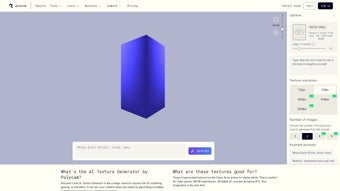
3D Textures by Polycam requires no installation on desktop. Simply navigate to the official web portal, sign in with your Polycam account (or create a free one), and you’re ready to generate textures. The interface presents a clean text box for your prompt, a dropdown to select resolution, and a “Generate” button. After processing—usually under a minute—the ZIP file becomes available for download.
Mobile Apps – iOS & Android
For creators who prefer working on tablets or smartphones, download the Polycam app from the App Store or Google Play. After installing, tap the “Textures” tab, enter your prompt, and the app will handle generation and storage directly on your device. The mobile version supports offline preview of textures before exporting to cloud storage services like Dropbox or Google Drive.
Operating System Support
The web platform is compatible with all modern browsers on Windows 10/11, macOS Monterey and later, Linux distributions, as well as Chrome OS. Since the processing occurs server‑side, there are no heavy GPU requirements on the client side. Mobile versions are optimized for iOS 13+ and Android 8.0+.
Step‑by‑Step Workflow
- Log in to your Polycam account.
- Enter a descriptive prompt (e.g., “rusty iron plates with scratches”).
- Select desired resolution (Standard 2K, High 4K, or Ultra 8K).
- Click “Generate” and wait for the AI to render the texture set.
- Download the ZIP file and extract the maps.
- Import the maps into your 3D software: assign albedo to the Base Color slot, normal to the Normal map slot, displacement to the Height slot, and roughness to the Roughness slot.
- Apply the material to your model, adjust tiling if needed, and render.
Pros & Cons
- Pros:
- Instant, high‑quality PBR textures without manual baking.
- Commercial license included—no hidden fees.
- Seamless integration with major 3D tools.
- Free tier available for hobbyists.
- Secure, cloud‑based processing.
- Cons:
- Resolution options limited in the free tier.
- Dependence on internet connection for generation.
- AI may occasionally misinterpret vague prompts.
FAQ & Conclusion
Can I use the generated textures in commercial video games?
Yes. Every texture pack comes with a royalty‑free commercial license, allowing you to incorporate the maps into games, films, AR/VR apps, or any other profit‑generating project without additional costs.
What file formats are the texture maps exported as?
All maps are exported as PNG files, which are widely supported across 3D software and game engines. The ZIP archive maintains a clear folder structure for easy import.
Is there a way to generate higher‑resolution textures beyond the free tier?
Yes. Upgrading to a Pro subscription unlocks 4K and 8K resolutions, batch generation, and priority processing on the AI servers. The subscription is optional and billed monthly or annually.
In summary, 3D Textures by Polycam delivers a powerful, user‑friendly solution for anyone needing realistic, PBR‑ready texture maps without the traditional bottlenecks of manual creation. Its AI engine, combined with a commercial‑friendly license and seamless compatibility with the major 3D ecosystems, makes it an indispensable tool for indie developers, studios, and hobbyists alike. The free web version offers a low‑risk entry point, while the optional Pro plan scales with professional demands. Ready to accelerate your asset pipeline and bring photorealistic surfaces to life? Download 3D Textures by Polycam now and start generating high‑quality textures in seconds.



.png)



